

Introduction
SEO and website monitoring for Google and AI search. VitalSentinel tells you what changed on your site and what to fix first.
SEO and website monitoring for Google and AI search. VitalSentinel watches the things that quietly cost you search visibility, traffic and revenue, and tells you what changed. It shows SEO and indexing changes within hours, and what to fix first.
What VitalSentinel does
Most teams find out that rankings dropped, analytics stopped, or a page broke only days or weeks later. VitalSentinel checks your site all day. When something changes for the worse, it shows the problem in the app, can send an alert, and tells you what to fix first.
VitalSentinel puts these signals in one app:
- What changed. A new noindex or a different title on a key page, robots.txt and sitemap changes, and site health issues. RUM Monitoring and Synthetic Monitoring show when Core Web Vitals get worse after a release. RUM Monitoring also shows new JavaScript errors.
- How Google and AI crawlers reacted. Indexing, Google Search Console data, Core Web Vitals from Google (CrUX), and what Googlebot and AI crawlers fetch. If a crawler cannot reach a page, AI cannot cite it. Crawl vs results shows if the pages that AI crawlers fetch get AI-search visits later.
- Traffic and uptime. Privacy-friendly Web Analytics, form submissions, uptime, SSL certificate and domain expiry.
Theo, the AI assistant in the app, answers questions about your data and about these docs. See Theo.
How the app is organized
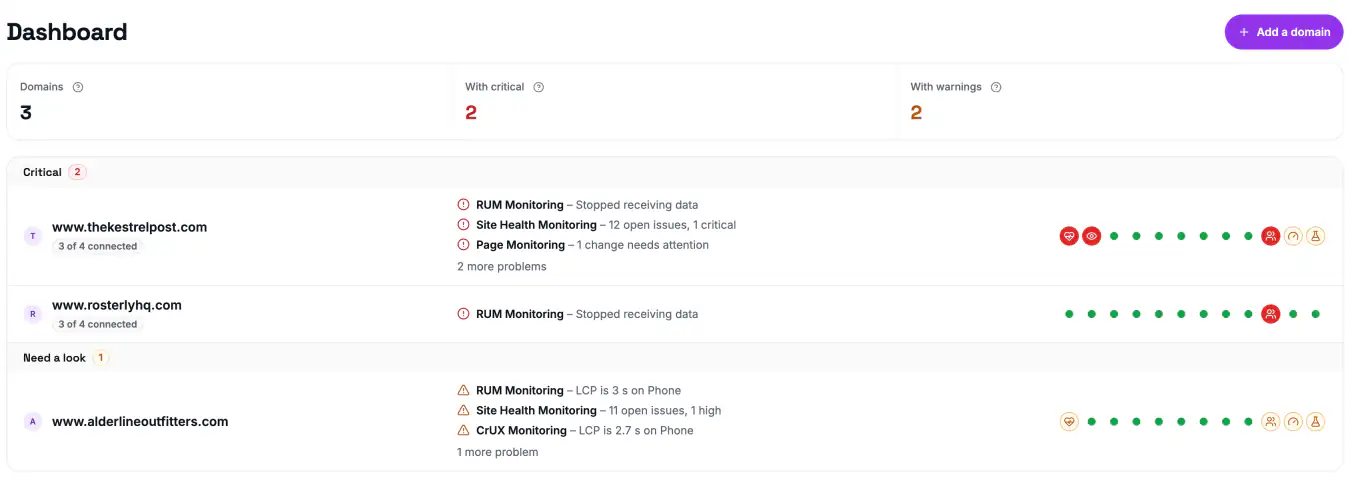
The app has one workspace for each team or client. A workspace holds your domains (websites), your team members and your billing. Each domain has its own pages for every module. The domain sidebar puts the modules in five groups. The groups below use the same names and order as the sidebar.
Domain
The Domain group has the pages about the domain as a whole.
| Sidebar entry | What it shows |
|---|---|
| Overview | A one-sentence verdict on the site and one tile for each module. See Overview. |
| Alerts | The rules that tell you when a metric crosses a limit. See Alerts. |
| Reports | Reports that combine data from all modules. See Reports. |
| Settings | Data sources, domain verification and the domain settings. See Domain settings. |
Site checks
The Site checks group has the three modules that use the VitalSentinel crawler on your pages.
- Site Health Monitoring checks a sample of your site all day. It tells you when a release breaks indexing, redirects or rendering. See Site Health Monitoring.
- Page Monitoring watches the pages that you pick. It tells you when a title, a redirect, a noindex or any element changes. See Page Monitoring.
- Form Monitoring counts the real submissions of your forms. It tells you when a form stops working. It uses its own script on your site, the Forms tag. See Form Monitoring.
Search & traffic
The Search & traffic group shows how people and search engines find your site.
- Google Search Console shows your clicks, impressions and positions in Google. See Google Search Console.
- Indexing Monitoring shows which of your pages Google has indexed, and why the others are not indexed. See Indexing Monitoring.
- Web Analytics counts your visitors, their sources, events, conversions and e-commerce sales. By default, it saves nothing on the visitor's device. See Web Analytics.
Crawling & availability
The Crawling & availability group shows if crawlers and visitors can reach your site.
- Server Log Monitoring reads your server logs. It shows what Googlebot and AI crawlers really fetch, where your crawl budget goes, and which bots are fake. See Server Log Monitoring.
- Sitemap Monitoring reads your sitemaps every day. It shows which pages were added or removed, and which sitemaps VitalSentinel cannot read. See Sitemap Monitoring.
- Robots.txt Monitoring checks your robots.txt file every hour. It warns you when a change can block crawlers. See Robots.txt Monitoring.
- Uptime Monitoring checks that your site is up. It alerts you when the site goes down, and shows when your SSL certificate and domain expire. See Uptime Monitoring.
Web performance
The Web performance group shows how fast your pages are.
- RUM Monitoring (Real User Monitoring) measures Core Web Vitals, JavaScript errors and user engagement on real visits. See RUM Monitoring.
- CrUX Monitoring shows your Core Web Vitals as Google reports them in the Chrome User Experience Report, for Phone and Desktop. See CrUX Monitoring.
- Synthetic Monitoring runs lab speed tests of your pages on Phone and Desktop. See Synthetic Monitoring.
SEO Extension
The VitalSentinel SEO Extension for Chrome checks the page that is open in your browser. It also shows your VitalSentinel data for that page. See SEO Extension.
Where the data comes from
Some modules start by themselves after you verify the domain. Other modules need a data source that you connect.
| Data source | Modules that use it |
|---|---|
| Nothing to connect | Site Health Monitoring, Page Monitoring, Sitemap Monitoring, Robots.txt Monitoring, Uptime Monitoring, CrUX Monitoring, Synthetic Monitoring |
| Tracking script on your site | RUM Monitoring, Web Analytics, Form Monitoring |
| Google Search Console | Google Search Console, Indexing Monitoring |
| Server logs | Server Log Monitoring |
VitalSentinel checks or collects nothing for a domain until you verify that you own it. See Verify ownership.
Who VitalSentinel is for
- SEO professionals see what changed in indexing, crawling, robots.txt, sitemaps and search performance after an audit or a release.
- Agencies monitor all client sites from one account. Each client can have its own workspace, team and billing.
- Web developers get real-user performance data, lab tests and JavaScript errors after each release.
- Website owners get a clear picture of the health of the site. The app explains each problem in plain words.
How to start
- Create a free account. VitalSentinel makes a Free workspace for you. See Create an account.
- Add your first domain. A short setup flow helps you connect tracking, Google Search Console and server logs. See Add a domain.
- Verify that you own the domain. Monitoring starts after this step. See Verify ownership.
- Finish the setup from the domain Overview. See Finish the setup.
For the shortest path, see Quick start.
Plans
Every plan has every module. The plans are different in the number of domains and in the size of the limits.
| Plan | Price (USD per month) | Domains |
|---|---|---|
| Free | $0 | 1 |
| Starter | $39 | 3 |
| Lite | $129 | 5 |
| Standard | $249 | 25 |
| Advanced | $449 | 50 |
For all limits of each plan, see Plans and limits.
Related
- Quick start - the shortest path to your first data
- Using the app - the sidebar, the filter bar and other parts of every page
- Theo - ask the AI assistant about your data
- Plans and limits - what each plan includes
- Glossary - plain definitions of the terms in the app
